 AI Mac Cleaner
Mac Slow After macOS 27? Is It the Bug Apple Fixed in 27.0.1
Mac running slow after macOS 27? Here's the 2-minute check that tells normal post-update settling apart from the real bug Apple already patched in 27.0.1.
If your Mac is running slow after the macOS 27 "Golden Gate" update, it's one of two things: normal post-update settling that clears up on its own within a day or two, or a real bug — already patched in 27.0.1 — that needs a specific fix. This post shows you how to tell which one you've got and what to do about it.
Quick answer: Check System Settings → General → Software Update first — if you're still on 27.0, installing 27.0.1 fixes the known performance regression. If you're already on 27.0.1, give it a day or two (Spotlight re-indexing and cache rebuilds are normal right after any major update); if it's been longer than that, open Activity Monitor and look for one process pinned at a flat, high % CPU rather than a changing mix of background tasks.
Try AI Mac Cleaner free for 7 days for a live view of what's actually using your CPU and disk right now, so you're not guessing from the fan noise alone.
Why a Mac slows down right after any major update, 27 included
Installing a new major version of macOS doesn't just swap out some files and restart. In the hours and days after, several background systems catch up at once:
- Spotlight re-indexes. A system-level update like this touches enough files that Spotlight's
mds_storesandmdworkerprocesses re-scan large parts of the disk to rebuild their search index. This is CPU- and disk-intensive but finite — it finishes on its own, usually within a few hours on an otherwise free Mac. - Photos and other libraries re-analyze. If any of your apps' on-device analysis models changed with the update,
photoanalysisdand similar background helpers can redo work they'd already finished before, quietly running in the background until they catch up. - Caches rebuild from scratch. System and per-app caches that existed under the old OS version are often invalidated by a major update, so the first day of use after updating involves more disk writes and cache misses than normal, until things settle — see is it safe to clear caches on a Mac? if you're tempted to clear them yourself before they finish rebuilding.
- Optimization and cleanup tasks run once. macOS performs a round of post-update housekeeping — checking extensions, rebuilding some system databases — that competes for CPU and disk I/O with whatever you're actually trying to do.
None of this is specific to macOS 27 — every major release does this — but it's worth naming it plainly, because "my Mac got slower the day I updated" has an obvious, boring, temporary explanation most of the time.
What might actually be a macOS 27 bug, not just settling-in
Apple's own 27.0.1 update, released two weeks after Golden Gate itself, is the kind of release that typically folds in fixes for issues reported in the first couple of weeks after a major version ships — performance regressions and battery drain are common categories for an early point release like that. If you updated straight to 27.0 and have been fighting a slowdown that hasn't let up after several days of normal use, the first and easiest thing to check is whether you're still on 27.0 or have 27.0.1 installed: System Settings → General → Software Update. If a point release is sitting there unapplied, installing it is a legitimate fix step, not just "turn it off and on again" advice — point releases exist specifically to patch the kind of issue a first wave of users surfaces.
How to tell settling-in from an actual problem
Give it a day or two of normal use after updating before concluding anything is wrong — the indexing and cache-rebuilding above genuinely does finish on its own. If it's been longer than that and things still feel off, open Activity Monitor, sort by % CPU, and look for one process pinned high for sustained stretches rather than a changing mix of background tasks. A single stuck process with a high, flat CPU number — as opposed to a changing cast of mds_stores, photoanalysisd and friends taking turns — points to something worth investigating on its own rather than general post-update settling, and is covered in more depth in Mac running slow? How to find the high CPU app. Continuity's own daemon, coreduetd, can also spike briefly right after the restart as it re-checks Handoff and device state, and coreduetd high CPU on Mac covers when that's expected versus when it's stuck.
A few other checks worth running at the same time:
- Confirm you're on 27.0.1, not 27.0, per the section above.
- Check free disk space. A major OS update temporarily needs a lot of headroom to stage itself, and a Mac that's low on free space afterward will feel slow regardless of what version it's running — see Mac storage full after macOS update if storage looks tight too, or find large files on your Mac to clear headroom quickly; it's common for the slowdown and the storage squeeze to show up together right after the same update.
- Check login items. System Settings → General → Login Items. An update occasionally re-enables a helper app you'd previously turned off, and every entry there competes for resources from the moment you log in.
- Restart once, deliberately, after the above settles — a restart clears any memory that's built up across the update process and the days since, and is worth doing once things have had a chance to finish their background work rather than as the very first response.
If it's lasting longer than a week, not just a few days
The settling-in window covered above — Spotlight re-indexing, cache rebuilds, one-time post-update housekeeping — is measured in hours to a couple of days on a Mac that's otherwise idle, not a week or more. If you've confirmed you're on 27.0.1, given it several days of normal use, and already checked Activity Monitor for one process pinned high per the steps above, and the lag still hasn't let up, a few more specific things are worth ruling out before concluding macOS 27 itself is just slow:
- Boot into Safe Mode once (hold Shift while the Mac restarts) and see if the lag is still there. Safe Mode disables non-Apple startup items and rebuilds some caches on its own; if the Mac feels noticeably snappier in Safe Mode, a third-party login item or kernel extension — not macOS 27 — is the more likely cause, and it's worth revisiting the login items check above with that specifically in mind.
- Check Console for repeating crash or hang reports around the time you updated: Applications → Utilities → Console → Crash Reports (under Diagnostic Reports in the sidebar). A specific app or helper process crashing and relaunching on a loop can present as generalized "everything feels slow" rather than an obvious crash, and clears up once that one app is reinstalled or updated, not by waiting on macOS itself.
- Compare against a second Mac on macOS 27, if you have access to one. If a similarly specced Mac handles 27 normally, that points toward something specific to your Mac's own configuration — storage headroom, login items, extensions — rather than a systemic issue with the release everyone would be hitting.
None of this replaces checking for 27.0.1 and giving the normal post-update settling period a chance first — most "slow since macOS 27" reports are exactly that, and resolve without needing any of the steps above.
Where AI Mac Cleaner fits
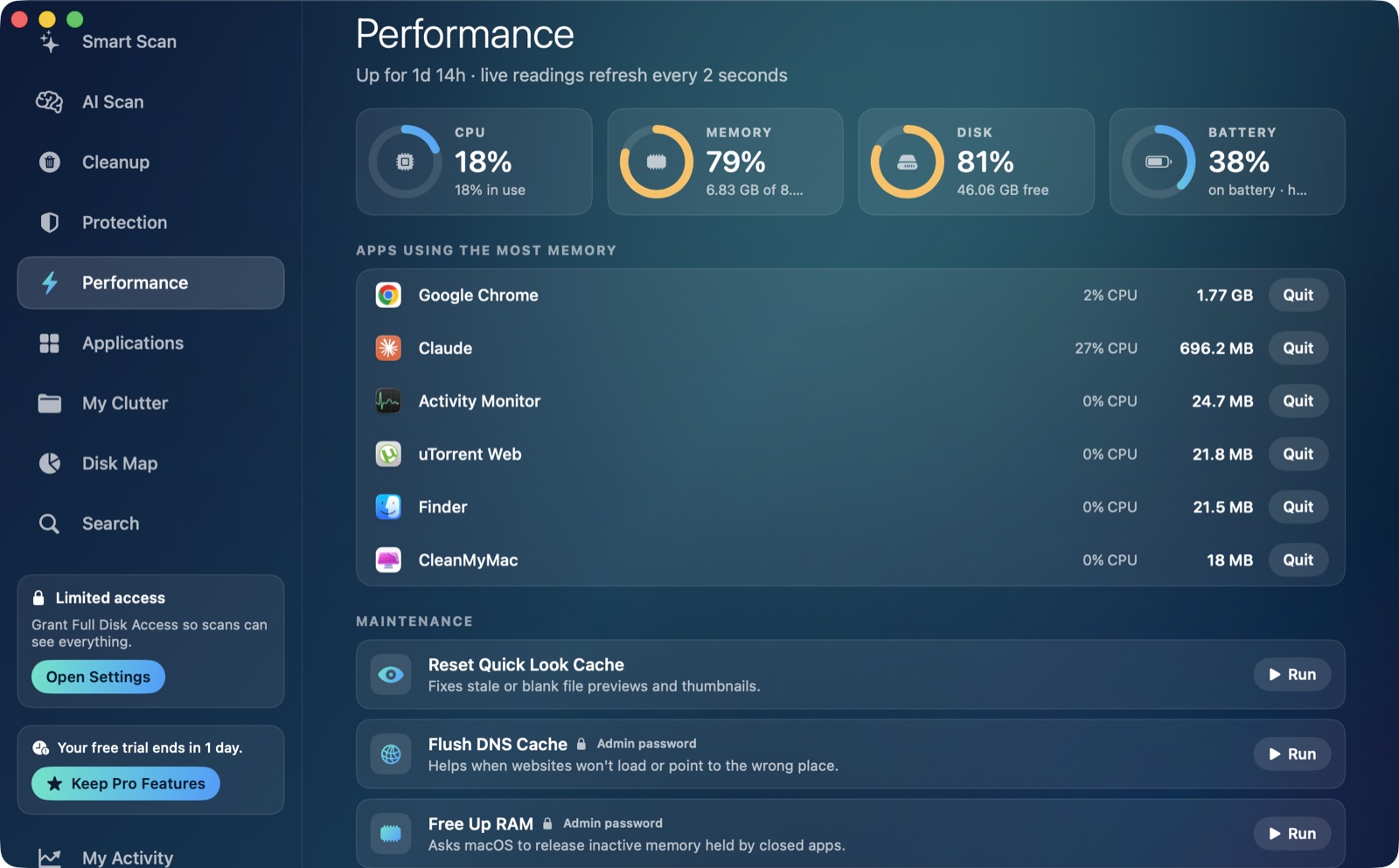
AI Mac Cleaner's Performance module gives you a live view of CPU, RAM, disk and battery (including health and cycle count), plus a ranked list of the heaviest apps running right now — which is exactly the view you want in the days after a major update, when the question isn't "is my Mac slow" but "is this one thing still busy, or is it actually finished." It also surfaces a launch agent manager, useful for checking whether an update reset any login items you'd previously turned off. None of this speeds up Spotlight's re-index for you — that's Apple's process to finish on its own schedule — but it does tell you, at a glance, whether you're still waiting on it or looking at something else.
For the storage side of the same update — installer leftovers, a System Data number that jumped — see the companion post, macOS 27 Golden Gate: storage full after updating, which covers that angle in detail rather than duplicating it here.
If you want a standing view of what's actually using your Mac's resources rather than guessing from the fan noise, AI Mac Cleaner has a 7-day free trial with every feature unlocked, no card required, and plans from $6.99/mo after that.
Frequently asked questions
My Mac is running slow after the macOS 27 update — what should I check first?
Check whether you're on 27.0 or 27.0.1, via System Settings → General → Software Update — 27.0.1 patches a known performance regression from the original release, so installing it is the single highest-value first step. If you're already on 27.0.1, the next check is time: give it a day or two for Spotlight re-indexing and cache rebuilding to finish before assuming anything is actually wrong.
Is it normal for a Mac to be slow for a few days after updating to macOS 27?
Yes, for the first day or two. Spotlight re-indexing, cache rebuilding and one-time post-update housekeeping all compete for CPU and disk right after any major macOS update, Golden Gate included, and normally finish on their own within hours to a couple of days on an otherwise idle Mac.
Does macOS 27.0.1 fix performance issues from the original 27.0 release?
Early point releases like 27.0.1, which followed Golden Gate's 14 September launch by about two weeks, commonly address the performance and stability reports that surface once an update reaches a wider audience. If you're still on 27.0 and have been fighting a slowdown, checking for and installing 27.0.1 via Software Update is a reasonable first step.
How do I know if it's Spotlight re-indexing or something actually wrong?
Open Activity Monitor and sort by % CPU. Re-indexing shows up as a changing mix of system processes (mds_stores, mdworker, photoanalysisd) each taking turns, and it tapers off over hours. A single process pinned at a high, flat percentage for a long stretch is a different, more specific issue worth investigating on its own.
Can AI Mac Cleaner speed up the macOS 27 re-indexing process?
No — re-indexing and the other post-update housekeeping tasks are Apple's own background processes and need to run to completion; nothing third-party should try to interrupt or force them. What AI Mac Cleaner's Performance module gives you is visibility into whether that work is still ongoing or has actually finished, so you're not left guessing from the fan alone.
Should I wait to update to macOS 27 if my Mac is already running slow?
If your Mac is already struggling with low free space or a stuck background process before you update, it's worth fixing those first — a major update needs free space to stage itself and runs more smoothly on a Mac that isn't already fighting a resource problem.
I'm already on 27.0.1 and it's been over a week — why is my Mac still slow?
At that point it's past the normal post-update settling window, which is measured in hours to a couple of days, not weeks. Boot into Safe Mode once to check whether a third-party login item or extension — not macOS 27 itself — is responsible, and check Console's Crash Reports around the date you updated for an app that's crash-looping rather than one single big slowdown.